Additional Examples
Paper Supplementary Example
This section explains how to load and execute small project described Supplementary of snakeobjects paper. We assume that you will work or a Linux or Mac. In addition, we assume that you have a conda or miniconda installed (Conda
Installation).
Everything else needed is inclucded in the
snakeobjectsPaperSupplementaryExample.tgz. When you
download and extract (tar xzf snakeobjectsPaperSupplementaryExample.tgz) file, you will
get a directory called snakeobjectsPaperSupplementaryExample. We assume here that this directory is placed in /tmp, but you can place it elsewhere.
Next execute following commands:
(base) .............$ cd /tmp/snakeobjectsPaperSupplementaryExample
(base) /tmp/snakeobjectsPaperSupplementaryExample$ conda env create
(base) /tmp/snakeobjectsPaperSupplementaryExample$ conda activate snakeobjectsPaperSupplementaryExample
(snakeobjectsPaperSupplementaryExample) /tmp/snakeobjectsPaperSupplementaryExample$ sobjects describe
# WORKING ON PROJECT /tmp/snakeobjectsPaperSupplementaryExample
# WITH PIPELINE /tmp/snakeobjectsPaperSupplementaryExample
Project parameters:
        inputDir: /tmp/snakeobjectsPaperSupplementaryExample/input
        chrAllFile: /tmp/snakeobjectsPaperSupplementaryExample/input/chrAll.fa
        pedigree: /tmp/snakeobjectsPaperSupplementaryExample/input/collection.ped
        fastqDir: /tmp/snakeobjectsPaperSupplementaryExample/input/fastq
        target: /tmp/snakeobjectsPaperSupplementaryExample/input/targetRegions.txt
Object types:
(snakeobjectsPapeSupplementaryrExample) /tmp/snakeobjectsPaperSupplementaryExample$ sobjects prepare
# WORKING ON PROJECT /private/tmp/snakeobjectsPaperSupplementaryExample
# WITH PIPELINE /private/tmp/snakeobjectsPaperSupplementaryExample
(snakeobjectsPaperSupplementaryExample) /tmp/snakeobjectsPaperSupplementaryExample$ sobjects run -j -q
# WORKING ON PROJECT /private/tmp/snakeobjectsPaperSupplementaryExample
# WITH PIPELINE /private/tmp/snakeobjectsPaperSupplementaryExample
UPDATING ENVIRONMENT:
export SO_PROJECT=/private/tmp/snakeobjectsPaperSupplementaryExample
export SO_PIPELINE=/private/tmp/snakeobjectsPaperSupplementaryExample
export PATH=$SO_PIPELINE:$PATH
RUNNING: snakemake -s /private/tmp/snakeobjectsPaperSupplementaryExample/Snakefile -d /private/tmp/snakeobjectsPaperSupplementaryExample -j -q
Job counts:
        count   jobs
        6       align
        3       callDenovos
        1       gatherDenovos
        6       indexBam
        1       makeBwaIndex
        6       reorganizedBam
        1       so_all_targets
        1       so_denovo_obj
        6       so_individual_obj
        1       so_reference_obj
        3       so_trio_obj
        35
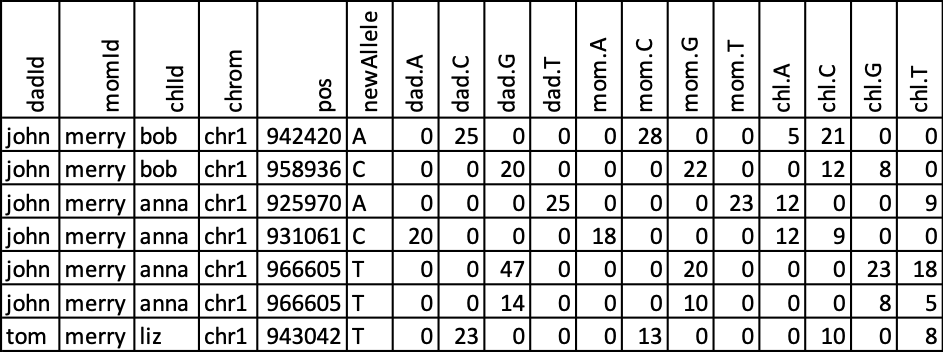
In the subdirectory denovo/o you will find allDenovoCalls.txt file. Opening it in excel with a little formatting can get:
Snakemake Tutorial Example
This section explains how to load and execute the small project reimplementing
in snakeobject
snakemake Tutorial example.
We assume that you will work or a Linux or Mac. In addition, we assume that you
have conda or miniconda installed (Conda
Installation).
Everything else needed is inclucded in the
snakemakeTutorialExample.tgz. When you
download and extract (tar xzf snakemakeTutorialExample.tgz) file, you will
get a directory called snakeomakeTutorialExample. We assume here that this directory is placed in /tmp, but you can place it elsewhere.
You can then follow the same steps as described in the Paper Supplementary example above.
Tests Demo Examples
There are nine mini projects in the directory snakeobjects/tests/demos.
Each mini project describes some features of snakeobjects.